GD COM 308 Web Design

Instructor
BARRY C. ERDELJON

Class meeting times
SEC. A1 TUE, WED & TH 6:00-9:00P.M.
StJO G105 (old 7)
SYLLABUS

Office Hours
TUE 05:00-06:00PM GAILHAC 33C
After class in Mac Lab
Other times by appointment.

e-mail: barry.erdeljon@marymount.edu

Required Text: 1) Web 2.0 Concepts and Applications
2) WordPress:Visual Quickstart Guide
Recommended Text: 1) Photoshop:Visual Quickstart Guide

Required Supplies: At least one 500MB+ USB Drive.
Two are recommended!

Educational priced Dreamweaver software:
Journey Ed http://www.journeyed.com/
Apple Education Store:
http://store.apple.com/us/browse/home/education_routing?mco=MTIxODk0Nw

Marymount WordPress
http://mublog.marymount.edu/MUBlog/

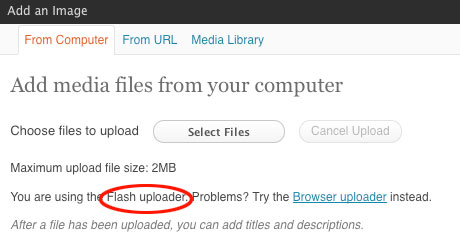
uploading

In the Mac lab please be sure to only use the "Flash loader. Using the "Browser" uploader will crash the computer

SU12 Student Website URLs FA08 SU09 SU10 SU11

RESOURCES
Creative Commons
http://search.creativecommons.org/

Music
http://www.royaltyfreemusic
.com/free-music-clips.html


Flash Kit
http://www.flashkit
.com/index.shtml


Inexpensive stock images
http://www.istockphoto.com
http://canstockphoto.com/
http://www.123rf.com
http://www.bigstockphoto.com

Clip art, photos,
sounds, and video clips


INSPIRATIONAL SITES
Lynda.com
Dreamweaver Showcase

REFERENCES
1. Web Monkey
2. http://www.wpdfd.com/
3. Designinteract.com
4. Creativepro.com

WRITING
Citing other Sites
Writing for the Web

DESIGNING
1. Good Sites Bad Sites
2. Layout
3. Typography
4. Color
5. Navigation

FILE FORMATS
Graphics & photos

SEARCH LISTINGS
Keywords & Description
Search engine registration

DREAMWEAVER HELP
Dreamweaver Support
On-line Tutorials

Weekly Textbook Readings and Questions
Web 2.0 Concepts
and Applications

Due each Wednesday
start of class posted to your class blog

WEEK 1: Chapter 1
Answer "Think" questions
and view the "Watch" video

WEEK 2: Chapter 2 & 3
No questions chapter 2 Chapter 3 Answer
"Think" questions and
view the "Watch" video

WEEK 3: Chapter 4
Answer "Think" questions
and view the "Watch" video

WEEK 4: Chapter 5
Answer "Think" questions
and view the "Watch" video

WEEK 5: Chapter 6
Answer "Think" questions
and view the "Watch" video


Every week - add a link to your class blog to a well designed and well written educational, topical, or nonprofit organization Web Site you find inspirational. Be ready to present to the class why the site is effective and added value to you when visiting the site.

WEEK 1: 5/1, 23, 24

LECTURE/LAB
Course Introduction.
What this class will achieve.
Discuss syllabus.

WordPress Lecture notes:
Open Source Software Lecture notes

Google Apps Blogger
WordPress - setting up a site, templates, fixed home page:

ASSIGNMENTS
Due
5/30/

1 Create a course blog site
Assignment
http://mudesign.net/webdesign/
su11/courseblogger.html

1. Definition and content outline - for Website discussed in class

WEEK 2: No Monday Class 5/30, 5/31, 6/1Friday (Monday make up class)

LECTURE/LAB
Work in progress critiques

WordPress - uploading content: text & images
Changing typography and page layouts

Creating a static home page
Link to WordPress How-To

ASSIGNMENTS
Due 5/31 redesign of -
Organizational Promotional Web sites
1. Revised Web site definition proposal including content outline with thumbnails of images
link to assignment

2. Set up Wordpress theme discussed in class for your redesigned Website
Your redesigned website should include:


... A. Background image - sized for web or tiled
... B. Static home page
........... With header image
............... With logo for TAO in the header image
... C. Menu bar with 5 primary links
........... One link to blog dynamic page
........... Four links to static pages
................ Different featured image for each static page
... D. A side bar
........... With calendar and an appeal i.e. donate or stop light pollution

3. Begin writing your subtopics and text and collecting visuals for each of your pages.

WEEK 3: 6/4, 6/6, 6/7

LECTURE/LAB
Typography and Images
Multimedia and Interactive Elements
WordPress - plugins
Work in progress critiques

Inserting text from Word into WordPress

ASSIGNMENTS
Due 6/7
redesign of -Organizational Promotional Web sites
1.Organizational Promotional Web sites
A. Research
B. Site Definition/proposal
C. Content Outline - all text and images -

WEEK 4: 6/11, 13, 14

LECTURE/LAB
Promoting and Maintaining a Web Site
Work in progress critiques

ASSIGNMENTS
Due 6/18: redesign of -Organizational Promotional Web sites
A. Revised site definition proposal
B.
Redesigned website
....Turn off comments on all pages and posts
.............Turning off comments option on home page
.............Managing comments
....Social media icons for each post - so viewers can forward the information
....All typography including subheads, text, and captions professionally sized and styled
.... 1.
Opening home page with 5 links
........ a. Thumbnails or icons for 3 audience specific primary links
........
b. Original header image - optional home page slider or slide show
........
c. Large thematic featured image & custom background color or image
.........
d. Logotype or icon branding the organization
.........
e. Sidebar with calendar of events and get involved or donate
.... 2.
3-4 secondary pages linked to the home page
........ a. Page title and sub title
........
b. Large thematic Image & custom background
........
c. 1-3 paragraphs of text
........ d. 3 smaller images or graphics for each page

........
e. Logotype or icon branding the org. - linked to home page
........
f. Thumbnails or icons for links to each secondary page
.........
g. Sidebar with calendar of events and get involved or donate
....
3. Link to Blog for the organization
........ a. Leave comments on for blog
........
b. 2-3 initial posts - as if you are a member of the organization or volunteer
............
1. post should be relevant to the topic of your organization

.....
4. At least 1 tertiary pages
........ a. Page title and sub title
........ b. stylistically same as secondary pages
........
c. Text and images as needed
........ d. Logotype or icon branding the org. - linked to home page
........
e. Thumbnails or icons for links to each secondary page

.....
5. The following must be including in your site on any page:
...............a.
A quote, saying, proverb, or parable
...............b.
Links to at least 3 related external sites
...............c.
Value added information on the topic i.e. history, trivia, cultural traditions etc...

WEEK 5: 6/18, 20, FINAL EXAM 6/21

LECTURE/LAB
Work in progress critiques

ASSIGNMENTS
Due 6/20: Personal portfolio Web sites
Design a portfolio Website using the Organic Showcase theme per in class instructions that includes:
....1. Turn off comments option on all pages except for your Contract page
.............Turning off comments option on home page
.............Managing comments
....2. All typography including subheads, text, and captions professionally sized and styled
....3. On your portfolio "Home" page:
............A logotype or logo plus your name
............Links in your menu for "Home", "About", "Philosophy", and "Contact"
............6 thumbnails of your designs, and or photographs, and or illustrations, and or artwork
....4. When you click on a home page thumbnail you should go to a larger version of the image with:
............A title above the large image
............A brief, couple words to a sentence, caption below the larger image
....5. Your "Philosophy" page should include:
............Your designer or artist statement
............Subhead in a color and typographically different from your text
............Two inspiration quotes - in typography different form the text
............Active link to a relevant website
....6. Your "About" page should include:
............A brief biography or your resume
............Subhead in a color and typographically different from your text
............Text wrapping around a picture -preferably a photo of yourself
....7. Your "Contact" page should include:
............Your email address and preferable your address and phone number
............Leave comments on for this page

Go to the tech support for your portfolio theme as needed

How to make the portfolio display on the home/Portfolio page:
http://www.organicthemes.com/documentation/SimplePortfolioTheme_Setup.pdf

How to write a designer statement - representing you philosophy

FINAL EXAM
All revised Final Web sites due
1. All assignments need to be liked to your class blog site
2. NOAA Ocean Explore Expidition website
... 1.
Critiques my email the week of July 16th.
... 2. Final redesigned website due the week of July 23rd

Pick a NOAA Ocean Explore Expidition from this site: http://oceanexplorer.noaa.gov/explorations/welcome.html
Create a website for the NOAA Ocean Explorer expidition using Organic Block theme
... 1. Turn off comments on all pages and posts
.............Turning off comments option
.............Managing comments

....2. All typography including subheads, text, and captions professionally sized and styled
... 3.
Socail media icons for each post

...
4. Unique logotype header
... 5. Custom seamless background Seamless backgrounds
... 6. Include a slider with at least 3-5 featured images - full width of slider space
... 7. At least 2 front page article post with photographs, headlines, and text
... 8. Right sidebar with recent posts and a recent comments
... 9. Left sidebar with 2 recent posts' thumbnails and copy
. 10. Three working links to:
........ A. HOME - per reference layout provided
........ B. GALLERY - photo gallery with expidition photographs- Link to adding gallery
........ C. ABOUT with text wrapping around a small picture
. 11. Social networking icons - in one place on the home page
. 12. Embed a NOAA video in one of your aticles or the about page - (scrool down for video) - http://learn.wordpress.com/get-flashy/media

All copy and images should come from the NOAA Ocean Explorer website
you chose to redesign
Link to design of finished website